Chrome Extension
The Market, Beside What You Are Reading
A side panel that opens beside any tab. It shows the market with no account, and your own portfolio once you sign in. It reads nothing on the pages you visit.
Two blocks
What the Panel Shows
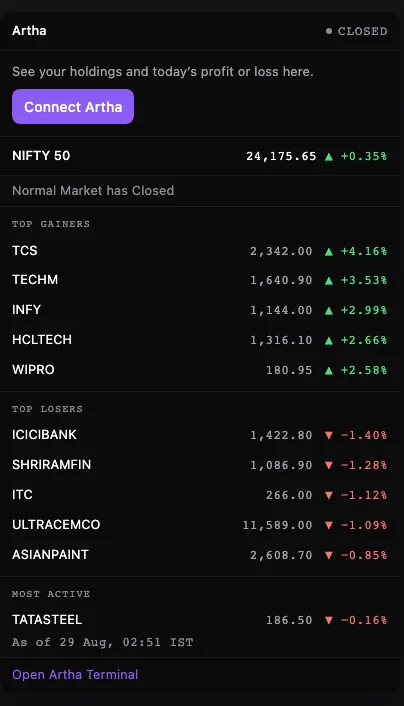
The market
No account
- Index levels, with the session change.
- The day’s largest gainers, losers and most-traded names.
- Headlines from Artha’s newswire.
- Market status from the exchange, so a trading holiday reads as closed rather than open.
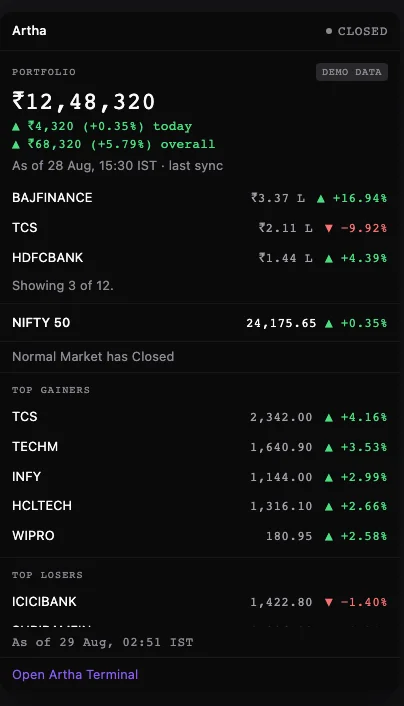
Your portfolio
After you sign in
- What it is worth, and today’s move.
- Your largest positions, by value.
- Every figure dated with its last sync from your broker.
- No broker connected is a normal state, and the panel says so.
Four steps
Quick Start
Install it
Select Add to Chrome, then Add extension.
Pin it
Select the puzzle-piece icon in the Chrome toolbar, then the pin beside Artha Terminal. The Artha icon now stays in the toolbar.
Open the panel
Select the Artha icon. The side panel opens on the market. No sign-in is needed for this step.
Add your portfolio (optional)
Select Connect Artha. The extension tells you what it will store, then Chrome opens a window on arthaterminal.com where you sign in and approve one permission.
Permissions
What It Can and Cannot See
An extension asks for permissions once, in a dialog most people approve without reading. Here is what this one asks for, written so you can check it against the store listing.
- One permission: portfolio:read
- It reads your holdings and your totals. Nothing else is asked for.
- Figures are as of your last broker sync
- Not a live broker session. The panel prints the sync time beside them.
- It reads no page you visit
- Two hosts only: arthaterminal.com and the host that signs you in. No script on any site, and no record of where you browse.
- It never sees your password
- You sign in on arthaterminal.com in a window Chrome opens. The extension gets a token, never the credential.
- It holds no broker credential
- Those stay on Artha.
- It cannot place an order
- Every call it makes is read-only.
Three steps
How to Withdraw Access
- Sign in on arthaterminal.com.
- Open Settings → API Keys, and find Connected assistants.
- Select Revoke beside Artha Terminal Extension.
It stops on the next request. The market block keeps working — it never needed your account.
Questions
Common Questions
- Does it work on Edge, Brave or Arc?
- Yes. Any Chromium browser that supports the side panel and installs from the Chrome Web Store.
- Can I use it without an Artha account?
- Yes. The market block is the whole product for a signed-out reader, and it renders with no sign-in at all.
- Why does my portfolio look older than the market figures?
- Market data refreshes on a timer while the market is open. Your portfolio shows your last broker sync, so it moves when you sync on Artha.
- Does it slow down my browsing?
- It refreshes on a timer while the market is open, and it does nothing at all on the pages you visit.
Artha is operated by Quantrast Technologies Private Limited, CIN U66190MR2026PTC475667. Artha is not a SEBI-registered Investment Adviser or Research Analyst: no advice, no target prices, no recommendations. The extension shows market data and your own positions, as of your last broker sync. Read the risk disclosure.
Something not working? A tool that answered wrongly, a client that will not connect, or a step above that does not match what you see.